> ## Documentation Index
> Fetch the complete documentation index at: https://docs.percify.io/llms.txt
> Use this file to discover all available pages before exploring further.
# Extract your brand from a website URL
> Paste your website and Percify reads your name, logo, colors, fonts, voice and audience into a Brand DNA you can edit, in about a minute.
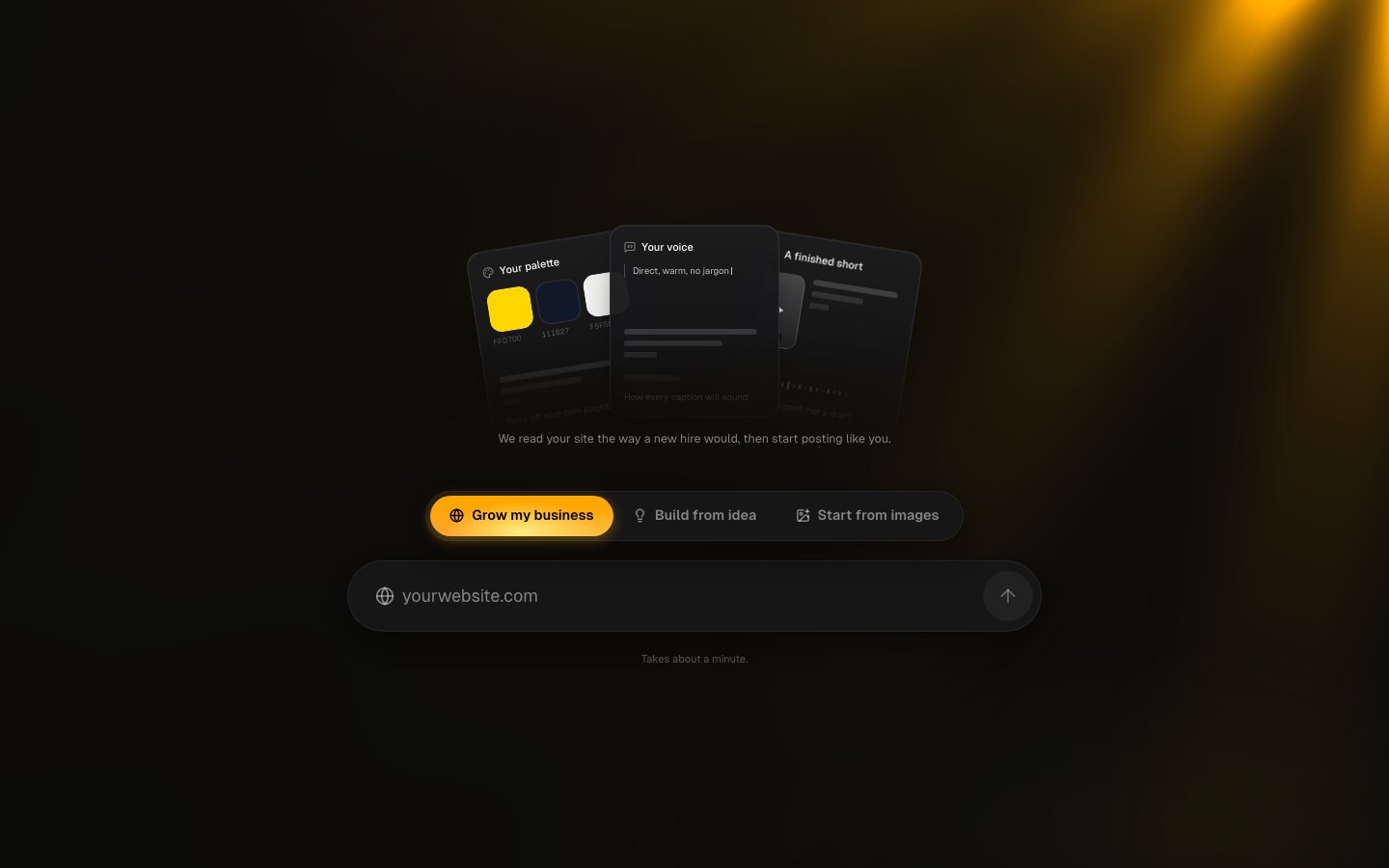
Percify Brand DNA reads your website and turns it into a brand profile you can edit: your name, logo, colors, fonts, tone of voice, audiences, what you sell and who you compete with. Paste a URL on the brand onboarding page and the read takes about a minute. The first brand read on an account uses no credits; each read after that costs 10 credits.
 ## What you need
* A Percify account. You can open the page signed out, but the read only starts after you sign up or sign in. Creating an account costs nothing; generating uses credits from a plan or a credit pack (see [credits](/percify/credits) and [payments](/percify/payments)).
* Your website address. No website yet? Use **Build from idea** or **Start from images** instead (see below).
## Read your brand from a URL
Go to [app.percify.io/brand-onboarding](https://app.percify.io/brand-onboarding).
Pick the **Grow my business** tab, type your site (for example `yourwebsite.com`) and press the arrow button.
While Percify reads your site it asks who the brand is (**Me**, **My company** or **A product**), what the content should do, and how much you want to post.
The **Your Brand DNA** screen shows what was read. Click a tile to fix the brand name, headline, language or brand colors, then press **Continue**.
## What you need
* A Percify account. You can open the page signed out, but the read only starts after you sign up or sign in. Creating an account costs nothing; generating uses credits from a plan or a credit pack (see [credits](/percify/credits) and [payments](/percify/payments)).
* Your website address. No website yet? Use **Build from idea** or **Start from images** instead (see below).
## Read your brand from a URL
Go to [app.percify.io/brand-onboarding](https://app.percify.io/brand-onboarding).
Pick the **Grow my business** tab, type your site (for example `yourwebsite.com`) and press the arrow button.
While Percify reads your site it asks who the brand is (**Me**, **My company** or **A product**), what the content should do, and how much you want to post.
The **Your Brand DNA** screen shows what was read. Click a tile to fix the brand name, headline, language or brand colors, then press **Continue**.
 ## What does Brand DNA read from my website?
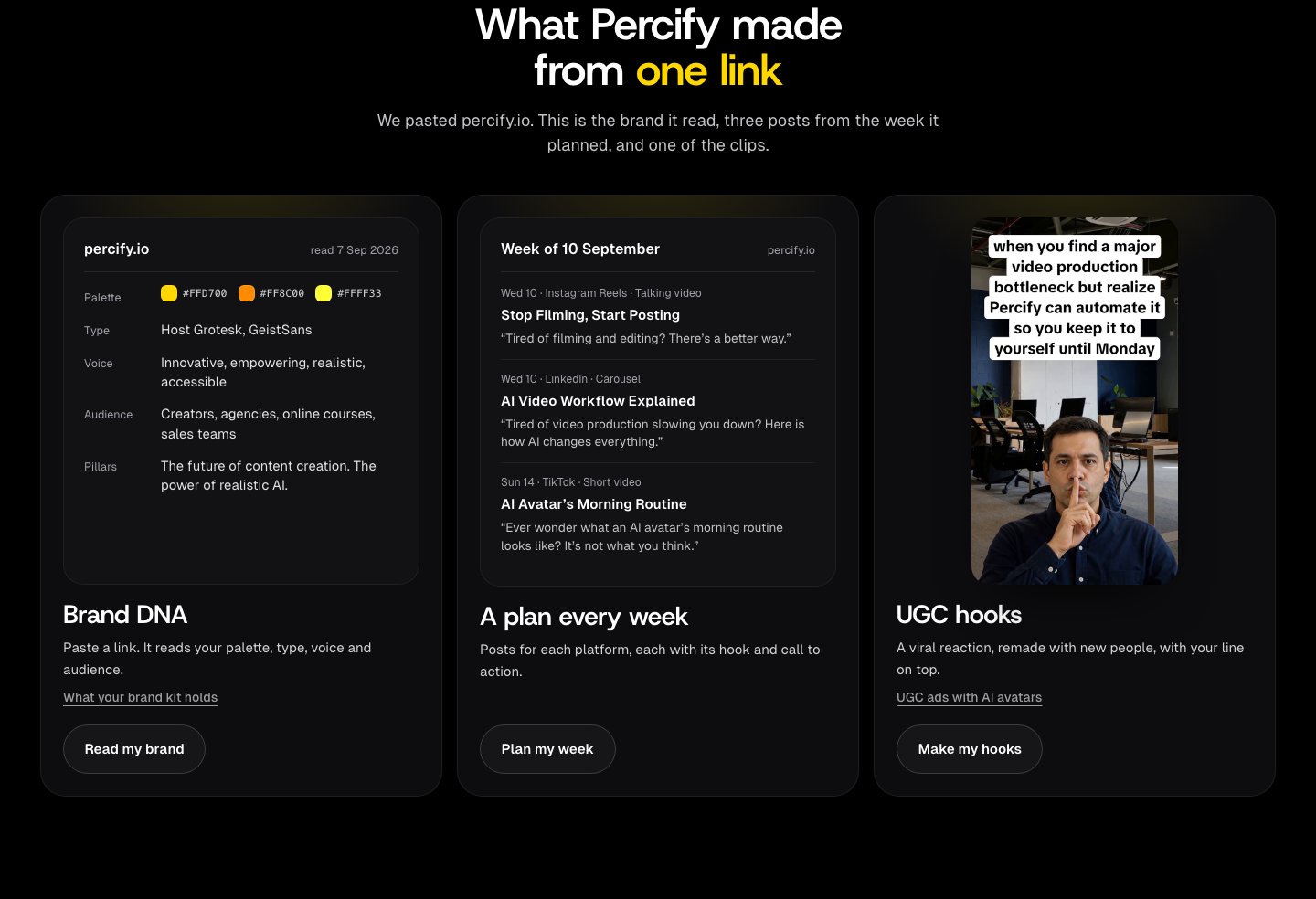
Percify fetches your homepage and up to three key pages it finds linked there (such as about, pricing, product or FAQ pages), then builds the profile from what it read.
| Part of the profile | Where it comes from |
| ------------------------- | ------------------------------------------------------------------------ |
| Name, description, logo | Your page title, meta description and logo files |
| Colors | Colors declared in your page styles and stylesheets |
| Fonts | Typefaces named in your styles and font links |
| Languages | The languages your site declares |
| Social links | Links to Instagram, TikTok, X, YouTube, LinkedIn, Facebook and Pinterest |
| Products | Products your pages publish as structured data (name, image, price) |
| Voice | Tone descriptors, example phrases in your voice, and words to avoid |
| Audience | Audience groups with their pain points |
| Offerings and positioning | What you sell, value props, differentiators, taglines, proof |
| Content pillars | 3 to 5 themes, each with example topics |
| Competitors | 3 to 6 named brands a customer would compare you to |
The read is instructed to stay grounded in your pages and not invent offerings, prices or claims. Anything it could not work out is listed under **What the read was unsure about**, so you know what to check.
Some sites keep their brand colors only inside the logo image or load everything with JavaScript. If a tile says **Not detected**, add the value by hand.
## No website? Start from an idea or images
* **Build from idea**: describe the business in 10 to 2,000 characters. Percify proposes a name, audience, voice, pillars and real competitors, and lists what it proposed so you can confirm or change it.
* **Start from images**: upload up to 4 JPEG, PNG or WebP images (your logo, product shots, or photos of yourself). Add a name, a sentence about what you do and who it is for, and optionally accounts you want to look like. Photos of a person build a personal brand; a logo and product shots build a business brand with colors sampled from the images.
## How much does it cost?
| Action | Cost |
| ------------------------------------------------------------------- | --------------------------------- |
| The first brand read on an account | No credits |
| Each further brand read, including a re-scan | 10 credits |
| A read that fails | Credits refunded |
| Reading a website whose brand was read or edited in the last 7 days | No charge: you get the saved read |
You can start up to 10 brand reads a day. Past that you see "Daily brand-analysis limit reached. Try again tomorrow." If you do not have enough credits you see "Analysing a brand costs 10 credits." See [not enough credits](/troubleshooting/not-enough-credits), [how credits work](/percify/credits) and [payments](/percify/payments).
## How to edit your Brand DNA
Open the brand in [app.percify.io/home/brands](https://app.percify.io/home/brands).
* **Brand** tab: the Brand DNA tiles, **What we offer**, **Products on the site**, **Voice**, **What you promise**, **Positioning**, **Proof**, **Content pillars**, and **Cast** (the faces and voices used in videos for this brand).
* **Audience** tab: who you are for.
* **Guidelines** tab: **Content posture**, **Guardrails** (what the brand may never say), **Competitors**, **Visual reference**, and house style rules such as **Say this, not that**, **Always say** and **Required line**.
* **Settings** tab: brand name, domain, languages ("Campaigns are written in these") and **Re-scan the site**.
**Re-scan the site** reads your pages again and replaces what the scan reads, such as voice, offerings, competitors and visual style, so hand edits to those fields are overwritten. Content posture, guardrails, house style, and audiences you marked as targets are kept. If the brand was read or edited in the last 7 days, a re-scan returns the saved read instead of reading the site again.
To take the profile elsewhere, use **Export brand scan** in the brand header: **Copy brief**, **Markdown**, **Claude skill**, **Spreadsheet** or **Raw data**.
## FAQ
Add brands from app.percify.io/home/brands, where all your brands are listed. Every brand read after your first costs 10 credits.
No. It only reads and stores your brand. Plans, posts and scheduling use it afterwards: see [plan a week of posts](/brand-os/weekly-plan), [Composer](/brand-os/composer) and [scheduling](/brand-os/scheduling).
The read only sees colors and fonts your site declares in its styles. Brands whose colors live only inside a logo image, or sites that build their styles in JavaScript, can come back empty. Click the tile and add them.
## Related
Turn the Brand DNA into a dated plan.
Composer writes your brand's words into formats that work now.
Track the accounts you are measured against.
What credits cost and what they buy.
See the product page at [percify.io/brand-os](https://percify.io/brand-os).
## What does Brand DNA read from my website?
Percify fetches your homepage and up to three key pages it finds linked there (such as about, pricing, product or FAQ pages), then builds the profile from what it read.
| Part of the profile | Where it comes from |
| ------------------------- | ------------------------------------------------------------------------ |
| Name, description, logo | Your page title, meta description and logo files |
| Colors | Colors declared in your page styles and stylesheets |
| Fonts | Typefaces named in your styles and font links |
| Languages | The languages your site declares |
| Social links | Links to Instagram, TikTok, X, YouTube, LinkedIn, Facebook and Pinterest |
| Products | Products your pages publish as structured data (name, image, price) |
| Voice | Tone descriptors, example phrases in your voice, and words to avoid |
| Audience | Audience groups with their pain points |
| Offerings and positioning | What you sell, value props, differentiators, taglines, proof |
| Content pillars | 3 to 5 themes, each with example topics |
| Competitors | 3 to 6 named brands a customer would compare you to |
The read is instructed to stay grounded in your pages and not invent offerings, prices or claims. Anything it could not work out is listed under **What the read was unsure about**, so you know what to check.
Some sites keep their brand colors only inside the logo image or load everything with JavaScript. If a tile says **Not detected**, add the value by hand.
## No website? Start from an idea or images
* **Build from idea**: describe the business in 10 to 2,000 characters. Percify proposes a name, audience, voice, pillars and real competitors, and lists what it proposed so you can confirm or change it.
* **Start from images**: upload up to 4 JPEG, PNG or WebP images (your logo, product shots, or photos of yourself). Add a name, a sentence about what you do and who it is for, and optionally accounts you want to look like. Photos of a person build a personal brand; a logo and product shots build a business brand with colors sampled from the images.
## How much does it cost?
| Action | Cost |
| ------------------------------------------------------------------- | --------------------------------- |
| The first brand read on an account | No credits |
| Each further brand read, including a re-scan | 10 credits |
| A read that fails | Credits refunded |
| Reading a website whose brand was read or edited in the last 7 days | No charge: you get the saved read |
You can start up to 10 brand reads a day. Past that you see "Daily brand-analysis limit reached. Try again tomorrow." If you do not have enough credits you see "Analysing a brand costs 10 credits." See [not enough credits](/troubleshooting/not-enough-credits), [how credits work](/percify/credits) and [payments](/percify/payments).
## How to edit your Brand DNA
Open the brand in [app.percify.io/home/brands](https://app.percify.io/home/brands).
* **Brand** tab: the Brand DNA tiles, **What we offer**, **Products on the site**, **Voice**, **What you promise**, **Positioning**, **Proof**, **Content pillars**, and **Cast** (the faces and voices used in videos for this brand).
* **Audience** tab: who you are for.
* **Guidelines** tab: **Content posture**, **Guardrails** (what the brand may never say), **Competitors**, **Visual reference**, and house style rules such as **Say this, not that**, **Always say** and **Required line**.
* **Settings** tab: brand name, domain, languages ("Campaigns are written in these") and **Re-scan the site**.
**Re-scan the site** reads your pages again and replaces what the scan reads, such as voice, offerings, competitors and visual style, so hand edits to those fields are overwritten. Content posture, guardrails, house style, and audiences you marked as targets are kept. If the brand was read or edited in the last 7 days, a re-scan returns the saved read instead of reading the site again.
To take the profile elsewhere, use **Export brand scan** in the brand header: **Copy brief**, **Markdown**, **Claude skill**, **Spreadsheet** or **Raw data**.
## FAQ
Add brands from app.percify.io/home/brands, where all your brands are listed. Every brand read after your first costs 10 credits.
No. It only reads and stores your brand. Plans, posts and scheduling use it afterwards: see [plan a week of posts](/brand-os/weekly-plan), [Composer](/brand-os/composer) and [scheduling](/brand-os/scheduling).
The read only sees colors and fonts your site declares in its styles. Brands whose colors live only inside a logo image, or sites that build their styles in JavaScript, can come back empty. Click the tile and add them.
## Related
Turn the Brand DNA into a dated plan.
Composer writes your brand's words into formats that work now.
Track the accounts you are measured against.
What credits cost and what they buy.
See the product page at [percify.io/brand-os](https://percify.io/brand-os).