> ## Documentation Index
> Fetch the complete documentation index at: https://docs.percify.io/llms.txt
> Use this file to discover all available pages before exploring further.
# Make UGC hook, split-screen and green-screen posts
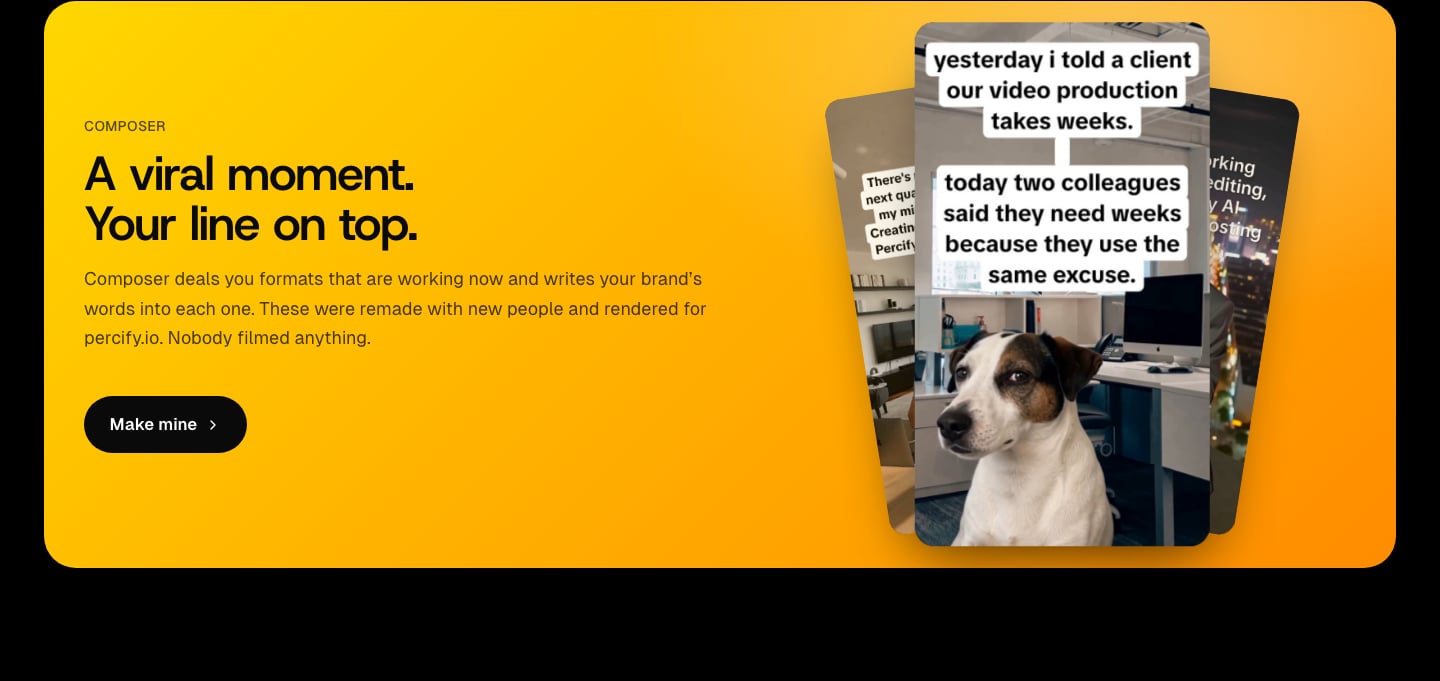
> Percify Composer turns formats that work now, like UGC hooks, split screens and green screen shorts, into posts in your brand's words, at no credit cost.
Percify Composer is a wall of **plays**: short video formats taken from real posts that performed, such as UGC hooks, split screens and green screen shorts. Each play is shown with words written for your brand from your Brand DNA, keeping the original's timing and sound. Keep the ones that fit, download them as MP4 files, or schedule them. Writing the words and downloading plays use no credits.
 ## What you need
* A brand with a Brand DNA. See [Extract your brand from a website](/brand-os/brand-dna).
* To post plays to your accounts, a Scale plan or higher, or an extra account slot. See [scheduling](/brand-os/scheduling). Downloading needs neither.
## Make a play for your brand
Pick your brand in the sidebar and open **Composer** (it sits under **Overview** and **Competitors**). Composer opens on the **Plays** tab.
Each card is a play wearing your brand's words. Hover a card to play it. Press **Keep it** on the ones you like, **Not for us** to swap in another play, or **New angle** to rewrite the words.
Click a card. On the **Yours** tab you see **The angle** the words were written from and what appears **On screen**. Pick another angle under **Write it from** (**Market**, **Pillars**, **Value**, **Edge** or **Your own**), or go back to one of your **Earlier takes**. The **Style** tab sets the type, size and spacing, and colour. The **Original** tab shows the post the play came from.
Press **Download** on the **Yours** tab to render an MP4 with the original sound. Or keep five plays: they gather in the dock at the bottom of the wall ("Keep five to fill a week"), and **Autoschedule** asks where they should post, or lets you **Save to library** instead.
## Which kinds of play are there?
| Kind | What it looks like |
| ------------------- | ------------------------------------ |
| UGC hooks | A real reaction, your words on top |
| Split screens | Two sides, compared |
| Green screen shorts | A cut out reaction over a scene |
| Scene edits | Words set into the footage |
| Post cards | A social post over a scene |
| Plain captions | Light words on black above the scene |
| Bold captions | Big heavy words above the scene |
| White panels | Dark words on a white bar |
| Serif captions | Book type above the scene |
Turn kinds on or off in **Settings** under **Formats** (Captions, Post cards, Green screen, Scene edits, UGC hooks). Split screens are grouped with Scene edits.
## How much does Composer cost?
| Action | Cost or limit |
| --------------------------------------------------- | --------------------------------------------------------- |
| Rewriting a play's words (New angle, Write it from) | No credits; up to 200 a day |
| Downloading a play as MP4 | No credits; up to 40 new files a day |
| New plays on the wall | Capped each day; a higher plan can raise the cap |
| Posting plays to your accounts | Needs Scale or higher, or an extra account at \$5 a month |
When a limit is reached you see "Daily limit reached. Try again tomorrow." At the end of the day's plays the wall says **That was it for today**, and offers **See plans** when a higher plan scrolls further.
## Settings that shape the wall
Open the **Settings** tab in Composer:
* **Brand mentions**: how often the words name your brand: **Never**, **Now and then** (about one play in four), **Often** (about half) or **Every play**.
* **Brand safety**: **Strict** (only plays any brand could post), **Balanced** (adds slapstick, pranks and light innuendo) or **Bold** (adds film violence, crime jokes and edgy moments).
* **Autoposting**: which platforms the plays are for, **1 a day**, **2 a day** or **3 a day**, **Every day** or **Weekdays**, and the posting hour. Posts start the next day, three hours apart. With Autoposting on, keeping a fifth play schedules the five, and you confirm once.
* **Autopilot**: posts at those times by itself and chooses plays by what performs. See [scheduling](/brand-os/scheduling).
* **Post card account**: the name, handle, picture and check mark shown on post card plays.
## Tips
* Your thumbs steer the wall: kinds you keep come round more often, and plays you pass on stop appearing for this brand.
* Once your posted plays have views, the wall and the words lean toward the kinds and angles that earned them. See [post performance](/brand-os/post-performance).
* Run a market scan on the brand's **Competitors** page to add **Market** angles to write from. See [competitor intelligence](/brand-os/competitor-intelligence).
## Related
Connect accounts and post your plays.
See which plays and angles get views.
The voice and angles the words come from.
Talking videos, carousels and images on a dated plan.
## What you need
* A brand with a Brand DNA. See [Extract your brand from a website](/brand-os/brand-dna).
* To post plays to your accounts, a Scale plan or higher, or an extra account slot. See [scheduling](/brand-os/scheduling). Downloading needs neither.
## Make a play for your brand
Pick your brand in the sidebar and open **Composer** (it sits under **Overview** and **Competitors**). Composer opens on the **Plays** tab.
Each card is a play wearing your brand's words. Hover a card to play it. Press **Keep it** on the ones you like, **Not for us** to swap in another play, or **New angle** to rewrite the words.
Click a card. On the **Yours** tab you see **The angle** the words were written from and what appears **On screen**. Pick another angle under **Write it from** (**Market**, **Pillars**, **Value**, **Edge** or **Your own**), or go back to one of your **Earlier takes**. The **Style** tab sets the type, size and spacing, and colour. The **Original** tab shows the post the play came from.
Press **Download** on the **Yours** tab to render an MP4 with the original sound. Or keep five plays: they gather in the dock at the bottom of the wall ("Keep five to fill a week"), and **Autoschedule** asks where they should post, or lets you **Save to library** instead.
## Which kinds of play are there?
| Kind | What it looks like |
| ------------------- | ------------------------------------ |
| UGC hooks | A real reaction, your words on top |
| Split screens | Two sides, compared |
| Green screen shorts | A cut out reaction over a scene |
| Scene edits | Words set into the footage |
| Post cards | A social post over a scene |
| Plain captions | Light words on black above the scene |
| Bold captions | Big heavy words above the scene |
| White panels | Dark words on a white bar |
| Serif captions | Book type above the scene |
Turn kinds on or off in **Settings** under **Formats** (Captions, Post cards, Green screen, Scene edits, UGC hooks). Split screens are grouped with Scene edits.
## How much does Composer cost?
| Action | Cost or limit |
| --------------------------------------------------- | --------------------------------------------------------- |
| Rewriting a play's words (New angle, Write it from) | No credits; up to 200 a day |
| Downloading a play as MP4 | No credits; up to 40 new files a day |
| New plays on the wall | Capped each day; a higher plan can raise the cap |
| Posting plays to your accounts | Needs Scale or higher, or an extra account at \$5 a month |
When a limit is reached you see "Daily limit reached. Try again tomorrow." At the end of the day's plays the wall says **That was it for today**, and offers **See plans** when a higher plan scrolls further.
## Settings that shape the wall
Open the **Settings** tab in Composer:
* **Brand mentions**: how often the words name your brand: **Never**, **Now and then** (about one play in four), **Often** (about half) or **Every play**.
* **Brand safety**: **Strict** (only plays any brand could post), **Balanced** (adds slapstick, pranks and light innuendo) or **Bold** (adds film violence, crime jokes and edgy moments).
* **Autoposting**: which platforms the plays are for, **1 a day**, **2 a day** or **3 a day**, **Every day** or **Weekdays**, and the posting hour. Posts start the next day, three hours apart. With Autoposting on, keeping a fifth play schedules the five, and you confirm once.
* **Autopilot**: posts at those times by itself and chooses plays by what performs. See [scheduling](/brand-os/scheduling).
* **Post card account**: the name, handle, picture and check mark shown on post card plays.
## Tips
* Your thumbs steer the wall: kinds you keep come round more often, and plays you pass on stop appearing for this brand.
* Once your posted plays have views, the wall and the words lean toward the kinds and angles that earned them. See [post performance](/brand-os/post-performance).
* Run a market scan on the brand's **Competitors** page to add **Market** angles to write from. See [competitor intelligence](/brand-os/competitor-intelligence).
## Related
Connect accounts and post your plays.
See which plays and angles get views.
The voice and angles the words come from.
Talking videos, carousels and images on a dated plan.