> ## Documentation Index
> Fetch the complete documentation index at: https://docs.percify.io/llms.txt
> Use this file to discover all available pages before exploring further.
# Cut basketball highlights automatically with AI
> Upload a basketball game to Percify, let it find the buckets, threes, blocks and steals, then render a highlight reel in 16:9 or 9:16.
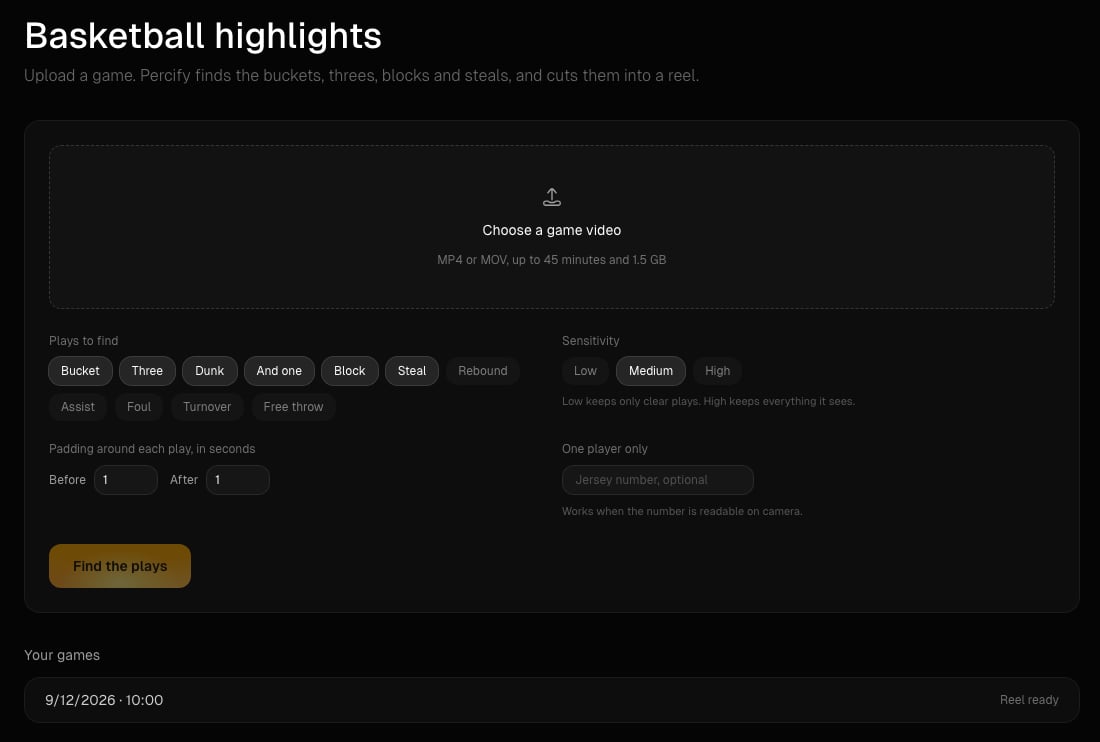
Percify's basketball highlights tool watches a game video you upload, lists the plays it finds (buckets, threes, dunks, blocks, steals and more) with a frame and a timestamp for each, and cuts the ones you keep into a highlight reel. You review the plays, choose landscape or vertical, and download an MP4.
 ## What you need
* A computer. The tool runs in the desktop web app at [app.percify.io/home/highlights](https://app.percify.io/home/highlights). On a phone, links to it open the mobile home instead.
* A Percify account. You can open the page signed out, but you sign in before anything is analysed.
* A game video up to 45 minutes long and under 1.5 GB. The page asks for MP4 or MOV.
* Credits for the detection and for the reel (see below).
## How to make a highlight reel
Click **Choose a game video** and pick the file. A longer game has to be split first: upload one half at a time.
Under **Plays to find**, pick the play types: Bucket, Three, Dunk, And one, Block, Steal, Rebound, Assist, Foul, Turnover and Free throw. Set **Sensitivity** (Low keeps only clear plays, High keeps everything it sees), the **Padding around each play, in seconds** (0 to 6 before and after), and optionally a jersey number under **One player only**.
Click **Find the plays**. The price shows next to the button before you click. Progress reads "Finding plays in part 1 of 4" and so on. A 30 minute game takes a few minutes, and you can leave the page and come back.
Each play shows a frame, its time, its type and a confidence percentage. Use **Starts** and **Ends** to nudge a clip by a second, **In the reel** or **Add to the reel** to include it, and the arrows to change the order. You can change the play types, sensitivity and jersey filter here without paying again.
Pick **Landscape 16:9** or **Vertical 9:16**, turn **Label each play** on or off, add an optional title (up to 60 characters) and optionally **Add a track** for music you own. With music added, **Keep game sound** mixes the music under the game audio; turn it off to use the music instead. Click **Render the reel**, then **Download**.
## How much does it cost?
You pay twice: once to find the plays and once for each reel you render. Both prices appear on the page before you click, and both are refunded if that step fails.
| Step | Price | Example |
| --------------- | -------------------------------------------------- | --------------------------------- |
| Find the plays | 2 credits per started minute of game video | A 40 minute game costs 80 credits |
| Render the reel | 1 credit per started 10 seconds of reel, minimum 1 | A 75 second reel costs 8 credits |
Rendering again after you change the plays charges for the new reel. A job that makes no progress for 30 minutes is stopped and refunded. See [how credits work](/percify/credits) for plan allowances.
## Limits
| Limit | Value |
| --------------- | ------------------------------------------------------------------- |
| Game length | 45 minutes per upload, at least 5 seconds |
| File size | Under 1.5 GB |
| Games at a time | One per account. A second game is refused until the first finishes. |
| Clip length | 1 to 30 seconds each |
| Reel length | Up to 10 minutes |
| Plays in a reel | Up to 60 |
| Music file | An audio file under 50 MB |
| Output | MP4 at 1280x720 (16:9) or 720x1280 (9:16) |
## Tips
* A wide camera angle that shows the hoop works best. If no plays are found, that is the first thing to check.
* A readable scoreboard helps: every score change should appear as a made basket or free throw.
* Missed shots are not listed. Rebounds cover offensive rebounds and contested defensive rebounds only.
* The jersey filter only keeps plays where the number was readable on camera, so it can hide plays you want. Clear it if the list looks short.
* Your last 20 games stay under **Your games**, so you can reopen a game and render a different cut later.
Only one game can be analysed or rendered at a time on an account. The message reads "A game is already being processed on your account. Wait for it to finish, then start the next one." Nothing is charged for the refused upload.
Not yet. Open it on a computer. The finished reel can be vertical 9:16 for phones and social apps.
No. Play types, sensitivity and the jersey number filter the plays that were already found. You only pay again when you render another reel.
## Related
What each plan includes and how charges and refunds work.
Break a short into shots and rebuild it with your own cast.
What to do when a step is refused for credits.
Fixes for videos that will not upload.
## What you need
* A computer. The tool runs in the desktop web app at [app.percify.io/home/highlights](https://app.percify.io/home/highlights). On a phone, links to it open the mobile home instead.
* A Percify account. You can open the page signed out, but you sign in before anything is analysed.
* A game video up to 45 minutes long and under 1.5 GB. The page asks for MP4 or MOV.
* Credits for the detection and for the reel (see below).
## How to make a highlight reel
Click **Choose a game video** and pick the file. A longer game has to be split first: upload one half at a time.
Under **Plays to find**, pick the play types: Bucket, Three, Dunk, And one, Block, Steal, Rebound, Assist, Foul, Turnover and Free throw. Set **Sensitivity** (Low keeps only clear plays, High keeps everything it sees), the **Padding around each play, in seconds** (0 to 6 before and after), and optionally a jersey number under **One player only**.
Click **Find the plays**. The price shows next to the button before you click. Progress reads "Finding plays in part 1 of 4" and so on. A 30 minute game takes a few minutes, and you can leave the page and come back.
Each play shows a frame, its time, its type and a confidence percentage. Use **Starts** and **Ends** to nudge a clip by a second, **In the reel** or **Add to the reel** to include it, and the arrows to change the order. You can change the play types, sensitivity and jersey filter here without paying again.
Pick **Landscape 16:9** or **Vertical 9:16**, turn **Label each play** on or off, add an optional title (up to 60 characters) and optionally **Add a track** for music you own. With music added, **Keep game sound** mixes the music under the game audio; turn it off to use the music instead. Click **Render the reel**, then **Download**.
## How much does it cost?
You pay twice: once to find the plays and once for each reel you render. Both prices appear on the page before you click, and both are refunded if that step fails.
| Step | Price | Example |
| --------------- | -------------------------------------------------- | --------------------------------- |
| Find the plays | 2 credits per started minute of game video | A 40 minute game costs 80 credits |
| Render the reel | 1 credit per started 10 seconds of reel, minimum 1 | A 75 second reel costs 8 credits |
Rendering again after you change the plays charges for the new reel. A job that makes no progress for 30 minutes is stopped and refunded. See [how credits work](/percify/credits) for plan allowances.
## Limits
| Limit | Value |
| --------------- | ------------------------------------------------------------------- |
| Game length | 45 minutes per upload, at least 5 seconds |
| File size | Under 1.5 GB |
| Games at a time | One per account. A second game is refused until the first finishes. |
| Clip length | 1 to 30 seconds each |
| Reel length | Up to 10 minutes |
| Plays in a reel | Up to 60 |
| Music file | An audio file under 50 MB |
| Output | MP4 at 1280x720 (16:9) or 720x1280 (9:16) |
## Tips
* A wide camera angle that shows the hoop works best. If no plays are found, that is the first thing to check.
* A readable scoreboard helps: every score change should appear as a made basket or free throw.
* Missed shots are not listed. Rebounds cover offensive rebounds and contested defensive rebounds only.
* The jersey filter only keeps plays where the number was readable on camera, so it can hide plays you want. Clear it if the list looks short.
* Your last 20 games stay under **Your games**, so you can reopen a game and render a different cut later.
Only one game can be analysed or rendered at a time on an account. The message reads "A game is already being processed on your account. Wait for it to finish, then start the next one." Nothing is charged for the refused upload.
Not yet. Open it on a computer. The finished reel can be vertical 9:16 for phones and social apps.
No. Play types, sensitivity and the jersey number filter the plays that were already found. You only pay again when you render another reel.
## Related
What each plan includes and how charges and refunds work.
Break a short into shots and rebuild it with your own cast.
What to do when a step is refused for credits.
Fixes for videos that will not upload.