> ## Documentation Index
> Fetch the complete documentation index at: https://docs.percify.io/llms.txt
> Use this file to discover all available pages before exploring further.
# The Create page: every Percify tool in one place
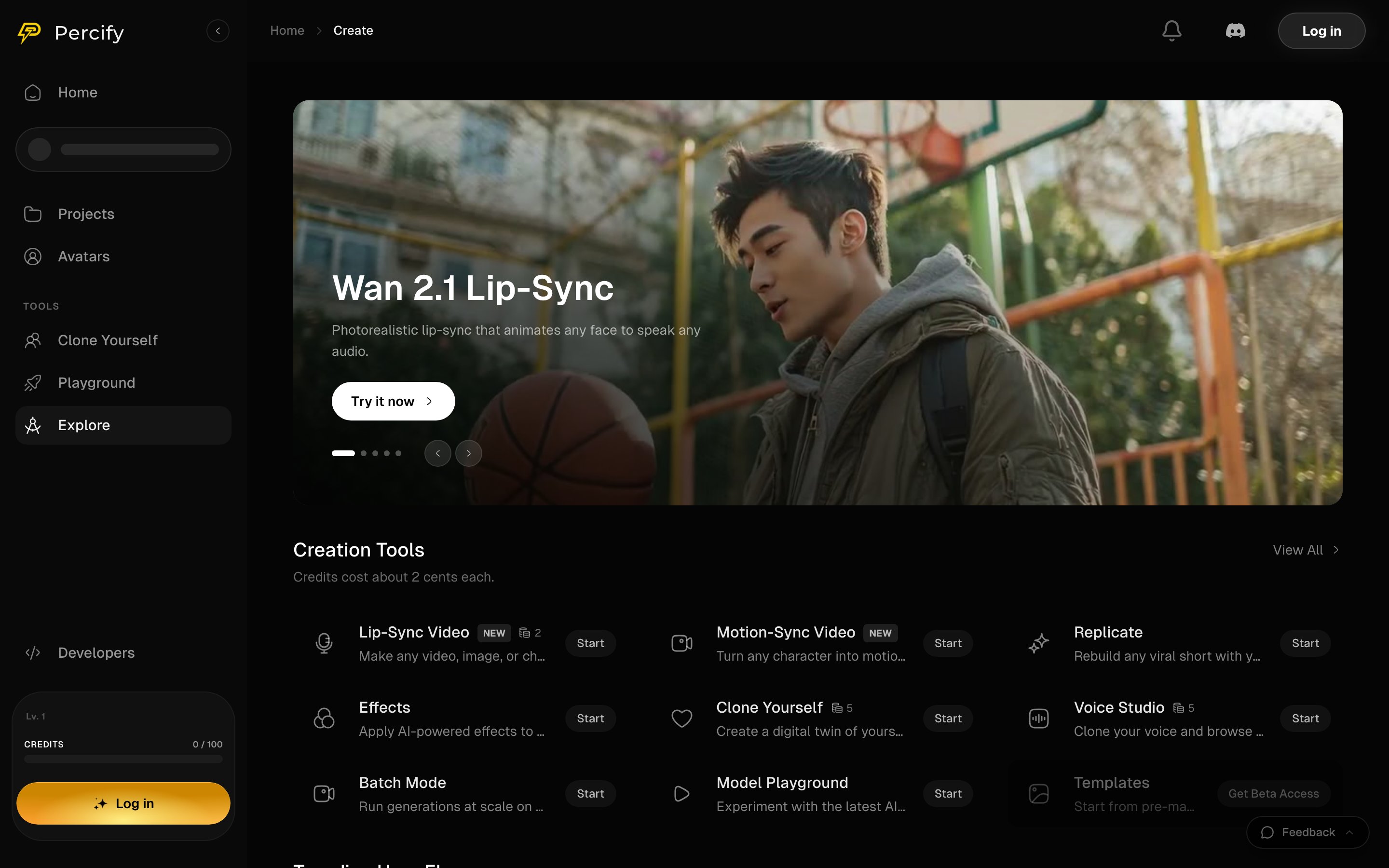
> Create is the Percify tool directory: Lip-Sync Video, Motion-Sync, Replicate, Effects, Clone Yourself, Voice Studio and Batch Mode, each with a Start button.
Create is the directory of everything you can make in Percify. Each tool has a short description and a **Start** button that opens it, and a featured model runs across the top. Open it at [app.percify.io/home/create](https://app.percify.io/home/create?utm_source=docs\&utm_medium=referral\&utm_campaign=create-create-hub).
 ## The tools
| Tool | What it makes | Where it is documented |
| ----------------- | ------------------------------------------------------- | ------------------------------------------------- |
| Lip-Sync Video | Animates a face in a photo or video to speak your audio | [Lip-sync a photo to any audio](/create/lip-sync) |
| Motion-Sync Video | Turns a character into motion from a reference | |
| Replicate | Rebuilds a viral short with your own cast | [Remake a viral short](/create/replicate) |
| Effects | Applies AI effects to a clip | |
| Clone Yourself | A digital twin of you that speaks | [Create your AI twin](/create/clone-yourself) |
| Voice Studio | Clones your voice and browses the voice library | [Clone your voice](/percify/voice-cloning) |
| Batch Mode | Runs generations at scale from one configuration | [Batch Mode](/create/batch-mode) |
Tools marked **NEW** are the most recently added. A tool showing **Get Beta Access** instead of **Start** is not generally available yet.
## Prices are per tool, not per page
Some cards show a small number beside the name: that is the credit price of one run of that tool. The Creation Tools heading also gives a rough sense of what a credit is worth, and the exact price of any run is always shown before you press Generate inside the tool itself.
For the full table, see [How Percify credits work](/percify/credits) and [every model's price](/models).
## Trending flows
Below the tools, Create shows flows that other people are running. A flow is a saved recipe: a model with its settings already chosen, so you can run a known-good setup instead of configuring one.
## FAQ
Yes. The prompt box on Home takes a description and picks the tool for you, and the sidebar links the tools you use most.
It is not generally available yet. The button asks for access rather than starting a run.
No. Each one prices its own run, and the price depends on the model and settings you pick. Nothing is charged until you press Generate.
## Related
The same ground, organised by what you are trying to produce.
One configuration, many generations.
Run any model, or two at once on one prompt.
Credit prices across the app.
## The tools
| Tool | What it makes | Where it is documented |
| ----------------- | ------------------------------------------------------- | ------------------------------------------------- |
| Lip-Sync Video | Animates a face in a photo or video to speak your audio | [Lip-sync a photo to any audio](/create/lip-sync) |
| Motion-Sync Video | Turns a character into motion from a reference | |
| Replicate | Rebuilds a viral short with your own cast | [Remake a viral short](/create/replicate) |
| Effects | Applies AI effects to a clip | |
| Clone Yourself | A digital twin of you that speaks | [Create your AI twin](/create/clone-yourself) |
| Voice Studio | Clones your voice and browses the voice library | [Clone your voice](/percify/voice-cloning) |
| Batch Mode | Runs generations at scale from one configuration | [Batch Mode](/create/batch-mode) |
Tools marked **NEW** are the most recently added. A tool showing **Get Beta Access** instead of **Start** is not generally available yet.
## Prices are per tool, not per page
Some cards show a small number beside the name: that is the credit price of one run of that tool. The Creation Tools heading also gives a rough sense of what a credit is worth, and the exact price of any run is always shown before you press Generate inside the tool itself.
For the full table, see [How Percify credits work](/percify/credits) and [every model's price](/models).
## Trending flows
Below the tools, Create shows flows that other people are running. A flow is a saved recipe: a model with its settings already chosen, so you can run a known-good setup instead of configuring one.
## FAQ
Yes. The prompt box on Home takes a description and picks the tool for you, and the sidebar links the tools you use most.
It is not generally available yet. The button asks for access rather than starting a run.
No. Each one prices its own run, and the price depends on the model and settings you pick. Nothing is charged until you press Generate.
## Related
The same ground, organised by what you are trying to produce.
One configuration, many generations.
Run any model, or two at once on one prompt.
Credit prices across the app.