> ## Documentation Index
> Fetch the complete documentation index at: https://docs.percify.io/llms.txt
> Use this file to discover all available pages before exploring further.
# Remake a viral short with your own cast
> Paste a TikTok link or upload a short, and Percify breaks it into shots, then regenerates it with your face, character or voice.
Replicate a short takes a TikTok, YouTube Short or Reel (a link or an uploaded file, up to 2 minutes), breaks it down shot by shot, and regenerates it with AI. You can put your own face, character or product in place of the original subject, re-voice the spoken lines with a sample of your voice, and download the replica next to a side-by-side comparison with the original.
 ## What you need
* A computer. Replicate runs in the desktop web app at [app.percify.io/home/replicate](https://app.percify.io/home/replicate), and it has a **Replicate** tile on the Explore page.
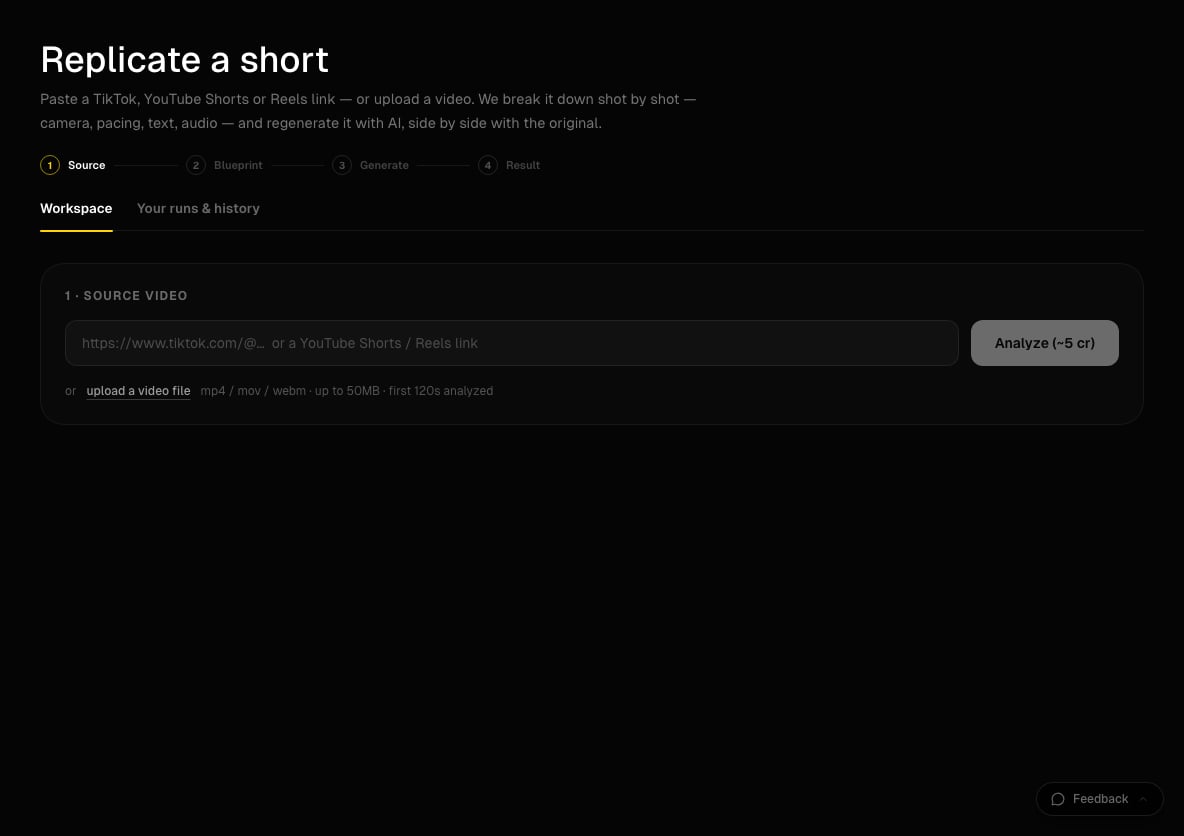
* A short under 2 minutes: a TikTok link, a YouTube Shorts or Reels link, or an MP4, MOV or WEBM file up to 50 MB.
* Optional: a photo of the face, character or product you want in the video, and 10 to 30 seconds of clean speech (no music) if you want the lines in your voice.
* Credits. Analysis costs 5 credits; generation is priced per clip (see below).
## How to replicate a short
Under **1 · Source video**, paste the link and click **Analyze (\~5 cr)**, or click **upload a video file**. Analysis usually takes 1 to 3 minutes. When it finishes, you see the shot breakdown.
Under **2 · Blueprint** you can:
* Type one instruction in the remix box and click **Remix all clips** to rewrite every clip.
* Under **Star in it**, upload your face, character or product to replace the original subject, then click **Adapt blueprint to it**.
* In the cast list, use **Swap this one** to replace a single character, and **Change voice** to upload a voice sample for a speaker.
* Pick which clips to generate: all of them, **Hook only**, or your own selection.
Pick a model card (for example **Closest Replica**, **Budget Replica**, **Precision Cuts**, **Motion Match** or **Re-imagine**), a quality (low, medium or high), a **Frame** (**Full-bleed**, **Original card** or **Blurred background**) and **Audio** (**Silent**, **Original, per clip**, **Original soundtrack**, **Upload track** or **Your voice**). Optionally tick **Burn in the original's text overlays** and **Marketing cut**.
Click **Preview the hook** to test the first part cheaply, or **Generate full replica**. Both buttons show the estimated credits. Each clip usually takes 1 to 3 minutes.
When "Your replica is ready" appears, switch **Text on** or **Text off**, then use **Download replica**, **Download side-by-side** or **Share**, which copies a link anyone can watch. Past runs stay under **Your runs & history**.
## How much does it cost?
| Step | Cost |
| ------------------------- | ---------------------------------------------------------------------------------------------------------------------------- |
| Analyze the short | 5 credits, refunded if the analysis fails |
| Generate clips | Priced per clip by the model card, the quality and the clip length. The generate button shows the estimate before you click. |
| Star swaps and your voice | Swapping a subject into a clip's frame and re-voicing lines with your sample are charged on top of the clips |
Credits for clips that do not finish are refunded automatically. Budget cards cost far less per clip than **Closest Replica**, so preview the hook on a budget card first when you are testing an idea. See [how credits work](/percify/credits).
## Is there a watermark?
Yes, on this tool only. Every finished replica has a small Percify mark in the top-left corner, as a disclosure that the video is AI-generated. The side-by-side comparison is labelled ORIGINAL and PERCIFY, with percify.io along the bottom. Other Percify outputs carry no Percify watermark.
## Limits
| Limit | Value |
| ----------------- | --------------------------------------------------------------------------------- |
| Source length | Up to 2 minutes. Longer videos are refused, not trimmed. |
| Uploaded file | MP4, MOV or WEBM, up to 50 MB |
| Links | TikTok, YouTube, Instagram, or a direct https link to an .mp4, .mov or .webm file |
| Remix instruction | Up to 300 characters |
| Voice sample | 10 to 30 seconds of clean speech works best |
## Tips
* If YouTube or Instagram links are refused with "temporarily unavailable", download the short and upload the file instead, or use a TikTok link.
* A TikTok or Instagram photo carousel is not a video. Paste a Reel, a TikTok video or a Short.
* Speakers without a voice sample keep their original audio, so you can re-voice one person and leave the other as is.
* Use a clear, front-facing photo for **Star in it**. A photo rejected by content moderation cannot be used.
## Related
Record a clean voice sample you can reuse.
Write several shots in one prompt instead of copying one.
Plans, monthly credits and refunds.
Fixes for videos and photos that will not upload.
## What you need
* A computer. Replicate runs in the desktop web app at [app.percify.io/home/replicate](https://app.percify.io/home/replicate), and it has a **Replicate** tile on the Explore page.
* A short under 2 minutes: a TikTok link, a YouTube Shorts or Reels link, or an MP4, MOV or WEBM file up to 50 MB.
* Optional: a photo of the face, character or product you want in the video, and 10 to 30 seconds of clean speech (no music) if you want the lines in your voice.
* Credits. Analysis costs 5 credits; generation is priced per clip (see below).
## How to replicate a short
Under **1 · Source video**, paste the link and click **Analyze (\~5 cr)**, or click **upload a video file**. Analysis usually takes 1 to 3 minutes. When it finishes, you see the shot breakdown.
Under **2 · Blueprint** you can:
* Type one instruction in the remix box and click **Remix all clips** to rewrite every clip.
* Under **Star in it**, upload your face, character or product to replace the original subject, then click **Adapt blueprint to it**.
* In the cast list, use **Swap this one** to replace a single character, and **Change voice** to upload a voice sample for a speaker.
* Pick which clips to generate: all of them, **Hook only**, or your own selection.
Pick a model card (for example **Closest Replica**, **Budget Replica**, **Precision Cuts**, **Motion Match** or **Re-imagine**), a quality (low, medium or high), a **Frame** (**Full-bleed**, **Original card** or **Blurred background**) and **Audio** (**Silent**, **Original, per clip**, **Original soundtrack**, **Upload track** or **Your voice**). Optionally tick **Burn in the original's text overlays** and **Marketing cut**.
Click **Preview the hook** to test the first part cheaply, or **Generate full replica**. Both buttons show the estimated credits. Each clip usually takes 1 to 3 minutes.
When "Your replica is ready" appears, switch **Text on** or **Text off**, then use **Download replica**, **Download side-by-side** or **Share**, which copies a link anyone can watch. Past runs stay under **Your runs & history**.
## How much does it cost?
| Step | Cost |
| ------------------------- | ---------------------------------------------------------------------------------------------------------------------------- |
| Analyze the short | 5 credits, refunded if the analysis fails |
| Generate clips | Priced per clip by the model card, the quality and the clip length. The generate button shows the estimate before you click. |
| Star swaps and your voice | Swapping a subject into a clip's frame and re-voicing lines with your sample are charged on top of the clips |
Credits for clips that do not finish are refunded automatically. Budget cards cost far less per clip than **Closest Replica**, so preview the hook on a budget card first when you are testing an idea. See [how credits work](/percify/credits).
## Is there a watermark?
Yes, on this tool only. Every finished replica has a small Percify mark in the top-left corner, as a disclosure that the video is AI-generated. The side-by-side comparison is labelled ORIGINAL and PERCIFY, with percify.io along the bottom. Other Percify outputs carry no Percify watermark.
## Limits
| Limit | Value |
| ----------------- | --------------------------------------------------------------------------------- |
| Source length | Up to 2 minutes. Longer videos are refused, not trimmed. |
| Uploaded file | MP4, MOV or WEBM, up to 50 MB |
| Links | TikTok, YouTube, Instagram, or a direct https link to an .mp4, .mov or .webm file |
| Remix instruction | Up to 300 characters |
| Voice sample | 10 to 30 seconds of clean speech works best |
## Tips
* If YouTube or Instagram links are refused with "temporarily unavailable", download the short and upload the file instead, or use a TikTok link.
* A TikTok or Instagram photo carousel is not a video. Paste a Reel, a TikTok video or a Short.
* Speakers without a voice sample keep their original audio, so you can re-voice one person and leave the other as is.
* Use a clear, front-facing photo for **Star in it**. A photo rejected by content moderation cannot be used.
## Related
Record a clean voice sample you can reuse.
Write several shots in one prompt instead of copying one.
Plans, monthly credits and refunds.
Fixes for videos and photos that will not upload.